Deploy applications
Open-source platform for deploying and managing applications. Simple, fast, and reliable deployment in just a few clicks.
Lightning Fast
Deploy in seconds with optimized build processes and global CDN.
Zero Configuration
No complex setup. Connect your repository and deploy instantly.
Production Ready
Built-in monitoring, scaling, and security for enterprise workloads.
Choose Your Dokploy VPS
Managed Dokploy VPS hosting with NVMe storage, dedicated IP, and 24/7 support.
Dokploy S
- 4 vCPU
- 8 GB RAM
- 50 GB NVMe
- Free SSL
- Dedicated IP
- Fully Managed
- Dokploy Panel
- 200 MB Connection
- 32 TB Traffic
Dokploy M
- 6 vCPU
- 16 GB RAM
- 100 GB NVMe
- Free SSL
- Dedicated IP
- Fully Managed
- Dokploy Panel
- 400 MB Connection
- 32 TB Traffic
Dokploy L
- 8 vCPU
- 30 GB RAM
- 200 GB NVMe
- Free SSL
- Dedicated IP
- Fully Managed
- Dokploy Panel
- 600 MB Connection
- 32 TB Traffic
Dokploy XL
- 10 vCPU
- 60 GB RAM
- 400 GB NVMe
- Free SSL
- Dedicated IP
- Fully Managed
- Dokploy Panel
- 1 Gbps Network
- 32 TB Traffic
Dokploy XXL
- 24 vCPU
- 120 GB RAM
- 600 GB NVMe
- Free SSL
- Dedicated IP
- Fully Managed
- Dokploy Panel
- 1 Gbps Network
- 32 TB Traffic
Powerful Deployment, Tailored for You
Unlock seamless multi-server deployments, advanced user control, and flexible database management — all with Dokploy's developer-focused features.
Flexible Application Deployment
Deploy any application using Nixpacks, Heroku Buildpacks, or your custom Dockerfile, tailored to your stack.
Native Docker Compose Support
Deploy complex applications natively with full Docker Compose integration for seamless orchestration.
Multi-server Support
Effortlessly deploy your applications on remote servers, with zero configuration hassle.
Advanced User Management
Control user access with detailed roles and permissions, keeping your deployments secure and organized.
Database Management with Backups
Manage and back up MySQL, PostgreSQL, MongoDB, MariaDB, Redis directly from Dokploy.
API & CLI Access
Need custom functionality? Dokploy offers complete API and CLI access to fit your needs.
Real-time Monitoring & Alerts
Monitor CPU, memory, and network usage in real-time across your deployments for full visibility.
Self-hosted & Open Source
Dokploy provides complete control with self-hosting capabilities and open-source transparency.
Docker Swarm Clusters
Scale your deployments seamlessly with built-in Docker Swarm support for multi-node applications.
No Vendor Lock-In
Experience complete freedom to modify, scale, and customize Dokploy to suit your specific needs.
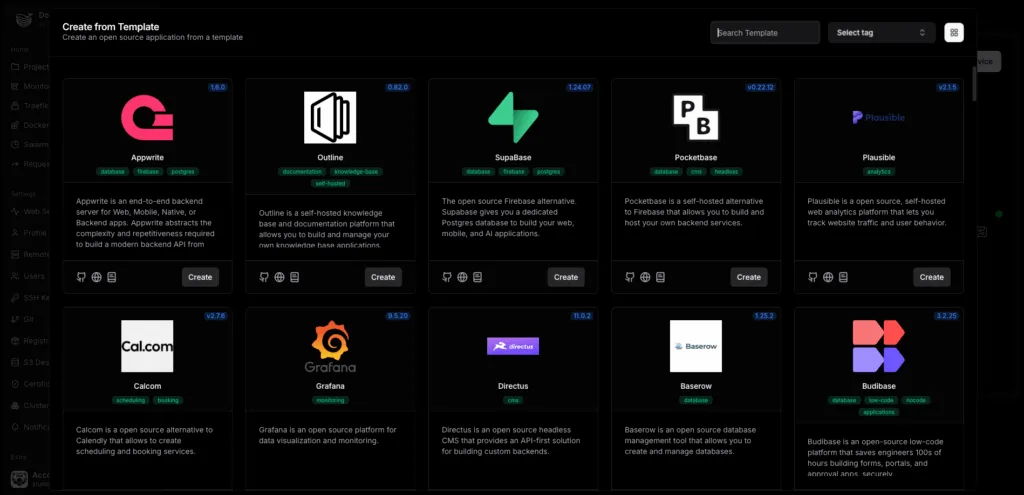
Open Source Templates
Get started quickly with pre-configured templates for popular tools like Supabase, Cal.com, and Pocketbase.
Built for Developers
Designed specifically for engineers and developers seeking total control and maximum deployment flexibility.
Intuitive Setup
Server management is easy and effortless. By utilizing OpenLiteSpeed for the webserver, you have access to all the LiteSpeed features.
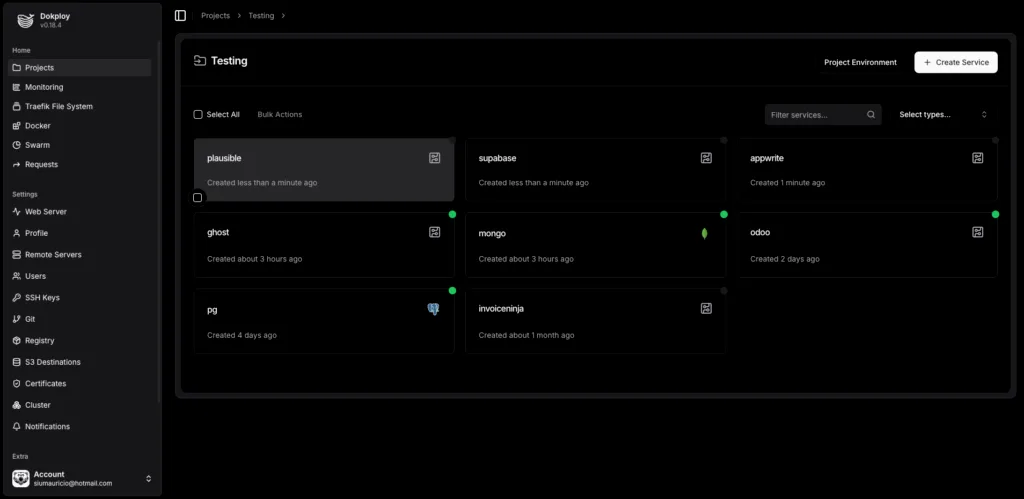
Simple, secure, and instantly scalable cloud infrastructure.
Dokploy provides simple, secure, and instantly scalable cloud infrastructure. Easily adjust CPU, RAM, and storage without downtime. Deploy complex apps intuitively, protected by a built-in firewall and malware scanner.
Docker Manager
Docker manager simplifies Docker Container and image management. Search and pull images from Docker Hub or create Containers from available/pulled images in a few clicks.
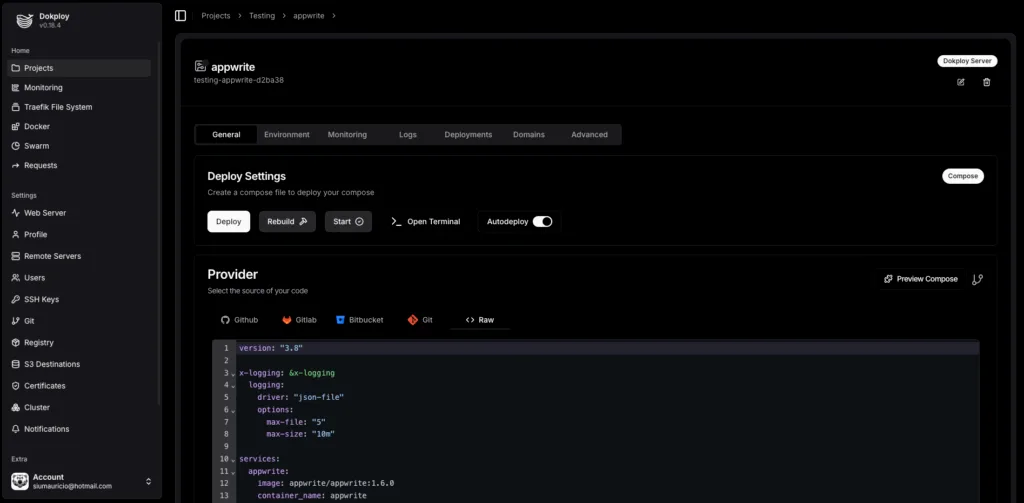
Deploy apps easily with Dokploy
Dokploy is an open-source deployment platform, which allows you to build, launch, and manage complex applications with ease.
Although you could host the software yourself, using Dokploy VPS hosting means you'll enjoy easier setup, faster performance, and better security.
Why Host Dokploy on Phluit?
Fully managed Dokploy hosting with enterprise-grade infrastructure and support
Fully Managed
Zero server maintenance. We handle updates, security patches, and infrastructure management.
24/7 Support
Expert support team available around the clock to help with any deployment issues.
Auto Scaling
Automatically scale resources up or down based on your application's demand.
Enterprise Security
SOC 2 compliant infrastructure with advanced DDoS protection and firewall management.
Automated Backups
Daily automated backups with point-in-time recovery and multi-region redundancy.
Global CDN
Lightning-fast content delivery with edge locations worldwide for optimal performance.
One-Click Setup
Deploy your Dokploy instance in under 60 seconds with pre-configured optimizations.
Cost Optimized
Pay only for what you use with intelligent resource allocation and cost monitoring.
Dokploy FAQs
Common questions about Dokploy VPS hosting on Phluit.
How customizable is Dokploy hosting?
Phluit's Dokploy VPS hosting offers root access, allowing you to customize the server to your exact liking. This means you can install any software you want, create a custom firewall for added protection, and modify server settings to fit your hosting needs.
Can I host multiple websites on Dokploy?
Yes, Dokploy allows you to host multiple websites on the same server using Docker containers. For each website, you need to create a Docker Compose file and deploy it to your server. After that, assign a unique domain name to each site.
How do I set up Dokploy on my VPS?
When you buy a Phluit VPS plan, you can install the Dokploy template during the onboarding process: Choose a VPS server location. Open the OS with Panel tab and select Ubuntu 24.04 with Dokploy. Create a root password or add an SSH key to log in to your VPS. Click Finish setup.
What is Dokploy VPS hosting?
Dokploy is an open-source platform designed to streamline the process of creating and launching apps. When you buy Dokploy VPS hosting, you basically rent a private virtual server to install, host, and run the software. At Phluit, our Dokploy VPS hosting comes with a template to make the setup process easier and faster. You will get Ubuntu and Dokploy pre-installed, so you can start deploying apps right away. You will also get dedicated server resources for robust performance, top-notch DDoS protection for enhanced security, and total freedom to configure the server settings the way you see fit.
Let Us Take Worries Away And Put Time Back In Your Day
We offer expert 24/7/365 problem-solving for all our VPS plans. Premium Support add-on where our Senior Support Engineers work as an extension of your in-house team.

Loved by Developers Worldwide
See why teams choose Phluit for their Dokploy hosting.
Deployed 12 Docker containers in under 5 minutes. Dokploy on Phluit is insanely fast.
The one-click Dokploy setup saved us hours of server configuration. Ubuntu + Dokploy pre-installed is brilliant.
Root access means I can customize everything. The NVMe storage makes database queries lightning fast.
Migrated from DigitalOcean. Same performance, better support, and the Dokploy panel is a game changer.
Docker Compose deploys work flawlessly. Our microservices architecture runs perfectly on Phluit's VPS.
24/7 support actually knows Docker and Dokploy. Not generic hosting support — real engineering help.
Scaled from the S plan to XL seamlessly as our startup grew. Zero downtime during the upgrade.
The DDoS protection saved us during a targeted attack. Our Dokploy apps stayed online the entire time.
Deployed Supabase, Redis, and PostgreSQL using Dokploy templates. Everything just works out of the box.
The API access lets us automate deployments from our CI/CD pipeline. Truly developer-first hosting.
Running 8 client projects on one Dokploy XL server. The resource isolation is excellent.
Automated daily backups give us peace of mind. Restored a database in 2 minutes after a bad migration.
The 1 Gbps network on the XL plan handles our video streaming service without breaking a sweat.
No vendor lock-in is huge for us. Open source Dokploy means we own our deployment stack completely.
Switched from Heroku and saved 60% on hosting costs. Dokploy on Phluit is the best alternative.
Docker Swarm clusters work beautifully. High availability for our SaaS app with zero configuration.
SSL certificates auto-provisioned via Dokploy. No more manual cert management for 20+ domains.
The real-time monitoring dashboard shows CPU, memory, and network across all containers. Essential.
Nixpacks support means zero Dockerfile maintenance. Push to GitHub, Dokploy builds automatically.
The user management system lets me give clients read-only access to their specific deployments. Perfect.
Deployed a Next.js app, a Go API, and a Python ML service all on one Dokploy server. Incredible flexibility.
Phluit's dedicated IP with Dokploy means our email deliverability is perfect. No shared IP issues.
The CLI access makes scripting deployments a breeze. Integrated it with our Jenkins pipeline in an hour.
32 TB traffic included is generous. Our high-traffic API serves millions of requests without extra charges.
Deployed Cal.com from a Dokploy template in 3 minutes. Self-hosted scheduling for our entire team.
The Dokploy S plan at $38/mo gives us 4 vCPU and 8GB RAM. More power than a $100 shared hosting plan.
MongoDB and PostgreSQL running side by side with automatic backups. Database management is painless.
Moved our entire agency's hosting to Dokploy on Phluit. 15 client sites, one dashboard, zero headaches.
The Heroku Buildpack support means we migrated from Heroku with zero code changes. Just pushed and it worked.
Multi-server deployment from one Dokploy panel. Staging and production on separate VPS, managed as one.
Running Pocketbase as our backend with Dokploy. The open-source template made it a 2-minute setup.
99.99% uptime over 8 months. Our SLA-critical fintech application hasn't missed a beat on Phluit.
The firewall customization with root access lets us implement zero-trust networking. Enterprise-grade.
Dokploy XXL with 24 vCPU handles our CI builds, staging, and production all on one server. Insane value.
Annual pricing saves 20%. For the performance we get, Dokploy on Phluit is the best deal in managed VPS.
Self-hosted GitLab + Dokploy on Phluit VPS. Complete development workflow without any third-party SaaS.