
Artisan Canvas
A fast, near-blank theme that looks complete on its own.
A fast, near-blank theme made for the Artisan builder that also looks complete on its own.
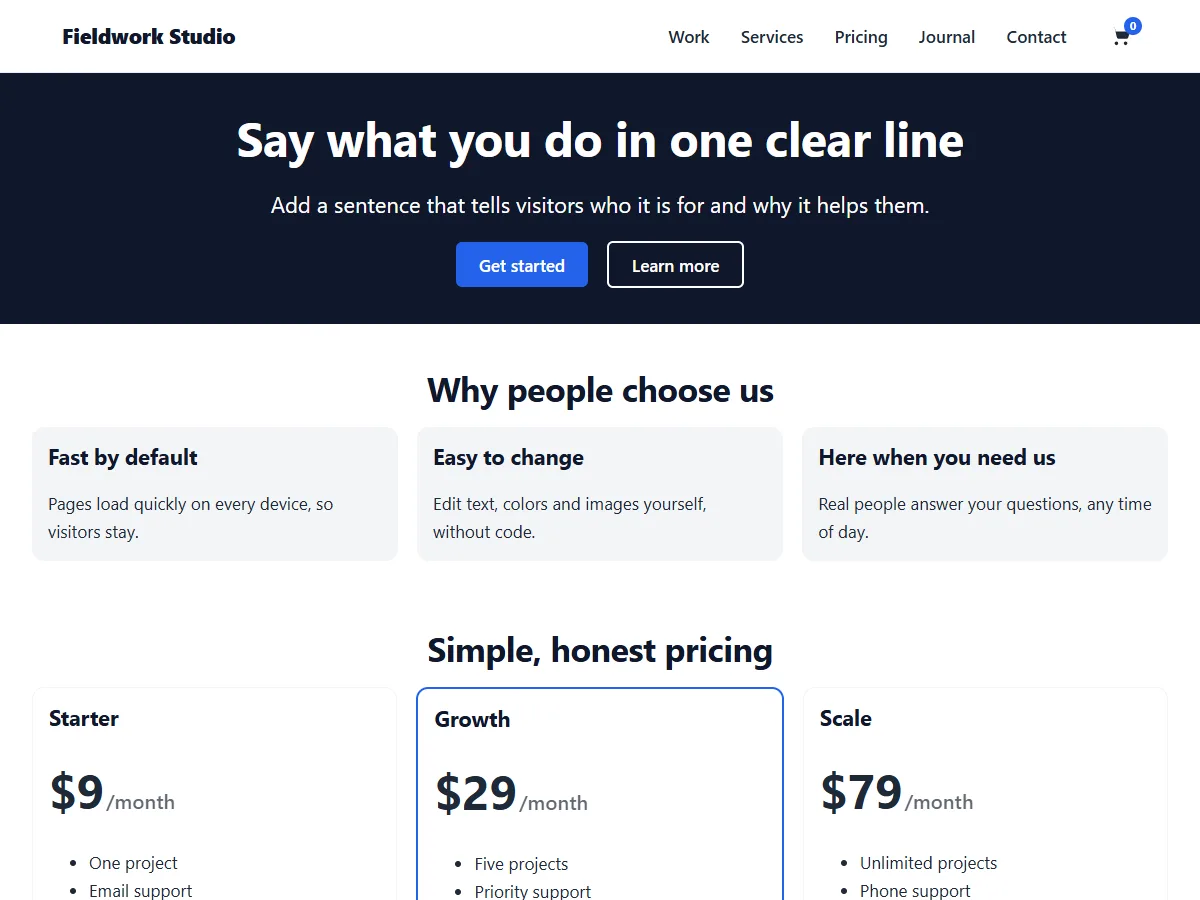
What Artisan Canvas does
Artisan Canvas is the companion theme for the Artisan page builder by Phluit. It stays out of the way of what you build, and it looks finished when you use it without a builder. It is free under the GPL, and it comes installed and active on new Phluit Managed WordPress sites.
Features
Made for Artisan
Artisan pages get the full width with no theme styles in the way; with Artisan Pro the Theme Builder takes over the header, footer and templates.
Complete on its own
Logo, two menus, colors, fonts, blog list or grid, sidebars, four footer widget areas and breadcrumbs with Herald.
Fast
No jQuery, one small deferred script, a few kilobytes of CSS and fonts served from the theme.
Customizer
Colors with automatic dark mode, typography, layout widths, header layouts and a sticky header.
Block editor
The editor looks like the front end, with patterns for a hero, features, pricing, testimonials, a call to action and contact details.
WooCommerce
Shop, product, cart and checkout styled to match, and a cart link with its count in the header.
Templates for every layout
Pick a template in the page or post settings.
- Default, Full width (header and footer, no title, no padding), Canvas (nothing but your content) and No footer
- Hide the title of any page under Artisan Canvas in its settings
- A full-width first block meets the header automatically when the title is hidden
Accessible and ready for any language
Built so everyone can use the sites you make with it.
- Skip link, visible focus rings and keyboard-friendly menus (Escape closes them)
- 44-pixel touch targets on phones and landmarks on every page
- Translation-ready, with logical CSS properties so right-to-left languages work without a separate stylesheet
Private by default
Fonts, scripts and styles are all served from your site, so visitors' browsers never contact anyone else.
- The only outside request is the update check: at most twice a day WordPress asks phluit.com whether a newer version exists
- It sends nothing about your site except the WordPress and theme versions
- New versions appear in Appearance → Themes and Dashboard → Updates
Download Artisan Canvas
Free, under the GPL. It is not part of the plugin membership.
How to install it
- Download the theme zip.
- In WordPress, go to Appearance → Themes → Add New → Upload Theme, choose the zip, click Install Now, then Activate.
- Go to Appearance → Customize → Artisan Canvas to set your colors, fonts, header and footer.
- In Appearance → Menus, assign a menu to the Primary location (and optionally the Footer location).
Requires WordPress 6.4+ · PHP 7.4+ · Licence GPLv2 or later. On Phluit Managed WordPress, Artisan Canvas comes installed and active on every new site.
Frequently asked questions
Do I need the Artisan builder?
No. The theme works on its own with the block editor. Artisan adds drag-and-drop page building, and Artisan Pro adds the Theme Builder.
How do I keep my changes when the theme updates?
Use the Artisan Canvas Child starter below: put your CSS in its style.css and your PHP in its functions.php. The first time you switch it on, it copies your Customizer settings, logo and menu locations.
How do I make a page with no title and no spacing?
Choose the Full width template in the page settings. For a page with no header and footer at all, choose Canvas.
Is it really free?
Yes. Artisan Canvas is distributed under the GNU GPL v2 or later, and it is not part of the plugin membership. On Phluit Managed WordPress it comes installed.
Also in the membership
Host your WordPress site with Phluit
Artisan Canvas comes installed, and every Phluit plugin is included on every plan.
