
Dokploy S
$24.99/mo
- 1 vCPU
- 2 GB RAM
- 50 GB SSD disk
- 2 TB transfer
- Dokploy installed, ready to sign in
- Root access and your own IPv4
- 12 locations to choose from
- Optional weekly backups (+20%)
Deploy applications effortlessly
Open-source platform for deploying and managing applications. Simple, fast, and reliable deployment in just a few clicks.
shop.git, main Nixpacks Docker Let's Encrypt 
shop.example.comLive
Connect your Git repository and Dokploy builds and deploys your app.
Dokploy comes installed, with your admin account already created.
See the logs and the CPU, memory and network use of your apps in Dokploy.
Prices per month in US dollars, excluding tax. No contract: pay monthly and change the size whenever you like.
Unlock seamless multi-server deployments, user roles, and flexible database management — all with Dokploy's developer-focused features.
Deploy any application using Nixpacks, Heroku Buildpacks, or your custom Dockerfile, tailored to your stack.
Deploy complex applications natively with full Docker Compose integration for seamless orchestration.
Deploy and manage your applications on other servers from the same panel.
Give each person their own account, as owner, admin or member.
Manage MySQL, PostgreSQL, MongoDB, MariaDB and Redis from Dokploy, with scheduled backups to S3 storage (all except Redis).
Need custom functionality? Dokploy offers complete API and CLI access to fit your needs.
Watch the CPU, memory, and network usage of your apps, and get notified when a deployment succeeds or fails.
Dokploy provides complete control with self-hosting capabilities and open-source transparency.
Scale your deployments seamlessly with built-in Docker Swarm support for multi-node applications.
Experience complete freedom to modify, scale, and customize Dokploy to suit your specific needs.
Get started quickly with pre-configured templates for popular tools like Supabase, Cal.com, and Pocketbase.
Designed specifically for engineers and developers seeking total control and maximum deployment flexibility.
Server management is easy and effortless. Dokploy's clean web interface lets you deploy and manage Docker apps and services without touching the command line.
Move to a bigger size from your dashboard when you need it. The server shuts down for a few minutes while it is resized, then starts again with your apps and data. Disks can grow but not shrink. You decide which ports are open, on the server's Firewall tab.
See every container and image on the server in one place: check status and logs, look at the configuration, open a terminal inside a container, or remove what you no longer need.
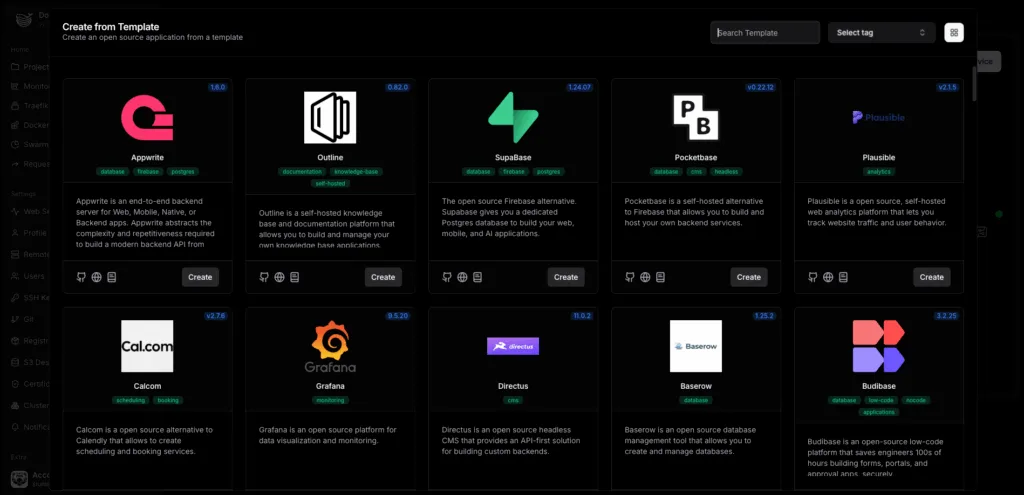
Dokploy is an open-source deployment platform, which allows you to build, launch, and manage complex applications with ease.
You could install the software yourself, but on a Dokploy VM it is already installed, and every port except SSH stays closed until your admin account exists.
Your own cloud server with Dokploy installed, for the price of the server
We run the infrastructure and install Dokploy with your admin account. After that the server is yours, with root access.
Reach us by chat, or open a ticket from your Phluit portal when something on the server needs attention.
Move to a bigger size from your dashboard. The server is off for a few minutes while it is resized.
Every port except SSH stays closed until your admin account exists. Then you set the firewall rules.
The last four copies are kept and restored in one click, for about 20% more.
Choose the data center closest to your visitors when you order.
Your server is online about a minute after payment, and Dokploy is installed a few minutes later.
You pay for the server. Dokploy costs nothing extra and there is no contract.
Common questions about Dokploy VM hosting on Phluit.
Phluit's Dokploy VM hosting offers root access, allowing you to customize the server to your exact liking. This means you can install any software you want, create a custom firewall for added protection, and modify server settings to fit your hosting needs.
Yes. Each website runs in its own Docker containers on the same server: add it to Dokploy from a Git repository, a Docker image or a Docker Compose file, and give it its own domain name. The limit is what your server's CPU, memory and disk can handle.
Pick a plan and click Deploy: the order page opens with Dokploy already selected. Choose a location and pay; your server is created and Dokploy is installed in a few minutes, with your admin account ready. The sign-in address, user and password are in your Phluit client area.
Dokploy is an open-source platform designed to streamline the process of creating and launching apps. When you buy Dokploy VM hosting, you basically rent a private virtual server to install, host, and run the software. At Phluit, our Dokploy VM hosting comes with a template to make the setup process easier and faster. You will get Ubuntu and Dokploy pre-installed, so you can start deploying apps right away. You will also get root access, your own IPv4 address, and total freedom to configure the server settings the way you see fit.
Questions before you order, or something on your server needs attention? Reach us 24/7/365 by chat or by ticket from your Phluit portal.